Tag: focus form filler automation

  • Automate Form Filling from Excel | Focus Form Filler

    Automate Form Filling from Excel | Focus Form Filler

    Automate Form Filling from Excel-

    Let’s be honest—nobody actually enjoys filling out forms.
    It’s slow, kinda boring, and eats up way more time than it should. But the thing is—forms are everywhere. Whether it’s client info, product details, or internal stuff, someone always ends up typing things out manually. And let’s face it, doing that every day? Not ideal.

    That’s where Focus Form Filler comes in. It helps you completely skip the manual part by filling in forms for you. Just load up your Excel sheet, click a few buttons, and watch the magic happen. No coding, no complicated setup.

    Why Bother With Manual Work?If you’re working with spreadsheets all day, jumping between tabs and copy-pasting data—ugh. You know how frustrating it gets. And yeah, it also leaves room for errors. A small mistake could lead to bigger issues, especially in client data.So why not just stop doing it the hard way?

    Meet Focus Form Filler – Your Form-Filling Shortcut

    This tool makes it super easy to automate any form—whether it’s in a browser, software window, or desktop app. It types stuff out like a real person would. Honestly, it’s kinda cool to watch.

    And guess what? It’s not one of those expensive tools with hidden fees. You pay once and that’s it. No monthly stress.

    Some Things You’ll Love:

    • No coding – seriously, none.
    • Works anywhere – browser or desktop, doesn’t matter.
    • Human-like typing – adds backspaces and varies speed to look natural.
    • Custom hotkeys – so you can start/stop anytime.
    • Runs in the background – just set it up and relax.
    • Supports Excel and CSV – upload your file and go.

    focus form filler automation

    How to Use It (It’s Super Simple)

    1. Get your Excel file ready.
      • Just make sure your columns are in the right order.
    2. Open Focus Form Filler.
      • Choose your file, adjust the speed, turn on extras like random typing or backspaces.
    3. Click Start and place your cursor.
      • That’s it. It’ll start typing your data into the form field by field.

    Time to Ditch the Typing

    Why spend hours filling the same thing over and over when this can do it for you?

    • Less effort
    • Less mistakes
    • More time for literally anything else

    Works with Any Application!

    excel data demonstration

    Stop wasting time and energy on manual form filling. Focus Form Filler is way to increased productivity, reduced errors, and a happier work life.

    Download the free trial today and see for yourself! click to download

    Check out our affordable pricing plans and choose the one that’s right for you! click to check

    Focus Form Filler isn’t just about working faster—it’s about working smarter. Once you try it, you won’t want to go back.

    If any queries arise, you can contact us through email at samdataservices(at)gmail.com or by filling out the contact form

  • Easy Form Automation: No Code Required (Desktop & Web)

    Easy Form Automation: No Code Required (Desktop & Web)

    Filling in forms by hand got you down? Wish there was an easier way? You’re in luck! Filling out forms can now be automated without having to write code. Use Focus Form Filler to help you complete all the forms your typical day requires,This is the article that will show you how it’s done, just to give you an idea of how simple automating a form is.

    Announcing Focus Form Filler – Your No-Code Answer.

    Focus Form Filler is especially developed for non-technical users. It doesn’t require difficult scripts or coding for form automation is for everyone. No need to struggle with code here, just pull your data into Excel or a CSV file and Focus Form Filler does the rest for you.

    How to Use Focus Form Filler:

    • First, you must get your data in order. Store the information in an Excel spreadsheet such that the columns match the fields in your target form. This is very important for the right data entry.
    excel sheet data representation

    Next, download and install Focus Form Filler from Sam data services. The installation process is straightforward and user-friendly.click to check our guide on installation click here

    Once installed, open the app.

     focus form filler dashboard

    Setting Up Your Automation:

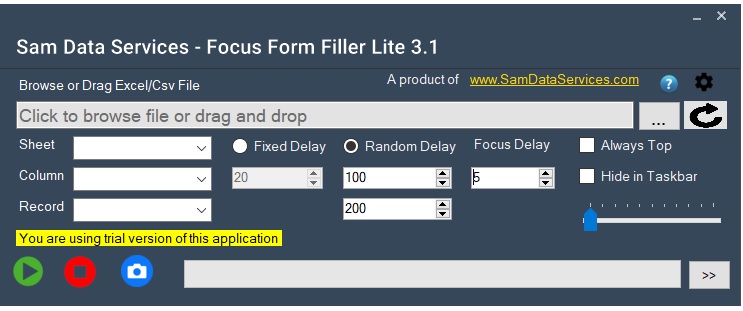
    • Focus Form Filler Configuration Now it is time to configure Focus Form Filler. Navigate and choose the Excel file with your data. Next, set the typing rate to simulate human input for more realistic appearance of automation.
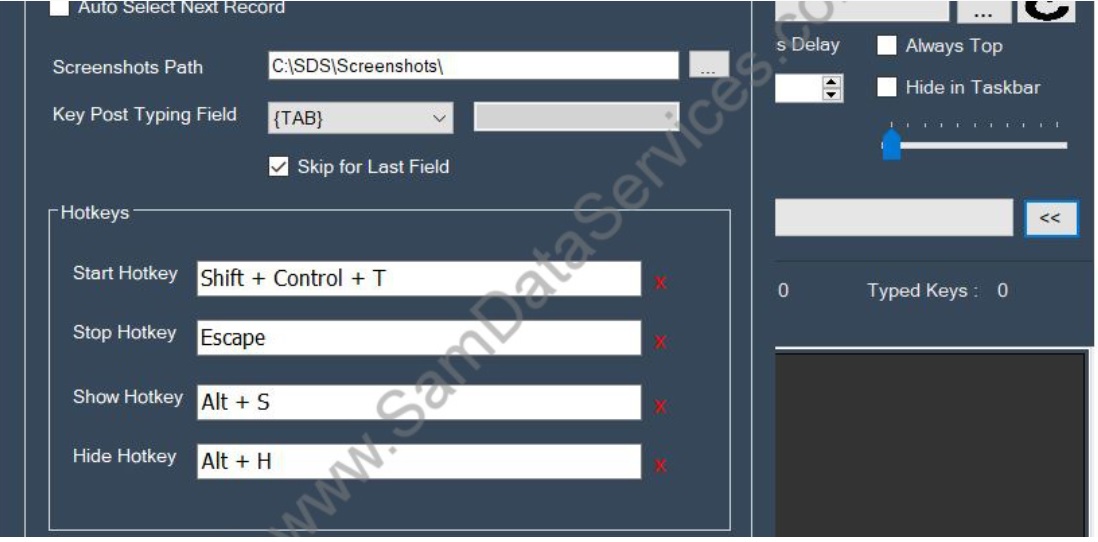
    • Additionally, you may configure hotkeys for kicking off or stopping the automation along with revealing or hiding the interface.
    • You can also check through the settings for more advanced options such as custom delays, screenshot capture, and more! The two offer more control of the automation process.
    focus form filler demonstration
    excel files upload demo
    demonstration of all features

    Automating Your Forms:

    • Click the “Start” button in Focus Form Filler, once you have set your settings.
    • After that, position your cursor on the initial field within the form that you would like to auto-fill.
    • Now,Focus Form Filler will start filling in the fields with the information from your Excel.
    start button of focus form filler
    form filling automation demo

    You’ll be amazed at how quickly and accurately it works.

    focus form filler automation
    submit button of focus form filler
    • In addition, you can configure Focus Form Filler to even automatically press the ‘Submit’ button for you after filling the form! This is great if you have a lot of forms to fill out. No more clicky-clicky, instead they do it all for you, hands-off.

    Advice For A Successful Automation:

    To make sure that automation runs without a hitch, open your Excel file and verify the accuracy and the format. And also change the typing speed according to the target application response time. Finally, custom delays if the form is needed with precise time only for entering the data.

    “Unlock the Power of No-Code Automation -Focus Form Filler is designed for anyone to automate form filling without requiring a technical background. So, instead of spending your time on manual data entry, let the power of no-code do the rest”

    Download it today and experience the difference. Click to download

    Check our guide to experiance smooth Activation of Focus form filler license click here

    If any queries arise, you can contact us through email at samdataservices(at)gmail.com or by filling out the contact form.