Tag: Focus Form Filler

  • How To Install Focus Form Filler Lite Complete Installation Guide

    How To Install Focus Form Filler Lite Complete Installation Guide

    Transform your data entry workflow with automated form filling software Are you tired of manually entering repetitive data into countless forms? This comprehensive guide will walk you through installing Focus Form Filler Lite 3.0, the ultimate form automation software that revolutionizes how you handle data entry tasks.

    What is Focus Form Filler Lite 3.0?

    Focus Form Filler Lite 3.0 is a powerful automated form filling tool that integrates seamlessly with your Excel spreadsheets to populate forms across desktop applications and web browsers. This productivity software eliminates tedious manual data entry, reduces human error, and saves countless hours of repetitive work.

    Key Benefits:

    • Excel integration for seamless data import
    • Cross-platform compatibility (desktop and web forms)
    • Time-saving automation that boosts productivity by up to 80%
    • Error reduction through consistent data entry
    • User-friendly interface suitable for all skill levels

    First, Download Focus Form Filler Lite 3.0

    • Go to the Focus Form Filler Lite 3.0 download page- click here
    focus form filler lite 3.0 page
    • Next,You may be asked to provide some basic information (name, email, country, etc.).Then Click the download button again to start the download.
    download page for focus form filller

    After that, Extract the Files-

    • When the file has downloaded, find the ZIP file on your computer (usually in the Downloads folder), right-click on the ZIP file and select Extract All.
    • Then, choose where you would like the files (your Desktop or a New folder).
    • Finally, click the Extract button to finish extracting the files.
    extraction files demo

    Once extracted, find the installer-

    • Now you need to find the installer file. This is done by double-clicking the installer file to start the installation.
    run the installation demo

    Welcome to the Installation Wizard

    • Now, an installation wizard will pop up. It’ll say welcome and give you a bit of info — go ahead and click Next to continue.
    welcome dashboard

    Choose Installation Options (Everyone or Just Me)

    • You will be presented with the option to install for “Everyone” or “Just for me”. Choose the option that best suits your needs and click “Next” to continue
    select installation folder of focus form filler 3.0

    User Account Control (UAC) Prompt

    • Allow Changes: A User Account Control (UAC) prompt might appear, asking if you want to allow the application to make changes to your device. Click “Yes” to allow the installation to proceed.

    Begin the Installation Process

    • Install: Click “Next” and start installing Focus Form Filler Lite 3.0 on your computer.
    next button demonstration

    Finally, hit “Close” when it’s done.

    • Close: Once the installation is complete, you’ll see a confirmation message. Click “Close” to close the installation wizard.
    complete installing focus form filler

    Now you can launch the application and begin automating your form filling tasks, saving valuable time and effort.

    Ready to revolutionize your data entry process? Download Focus Form Filler Lite 3.0 and experience the future of form automation!

    Focus Form Filler Lite 3.0 represents a significant advancement in form automation technology. By following this comprehensive installation guide, you’ll quickly transform your data entry processes and experience dramatic productivity improvements.

    Start your journey toward automated form filling today and discover how this powerful Excel-integrated software can streamline your workflow, reduce errors, and save valuable time on repetitive tasks.

    Need Help or More Information?

    Product Page: Visit the Focus Form Filler Lite 3.0 product page for detailed information about the software’s features and benefits: click here

    If any queries arise, you can contact us through email at info(at)samdataservices.com or by filling out the contact form

  • Announcing Focus Form Filler Lite 3.0 free download

    Announcing Focus Form Filler Lite 3.0 free download

    Announcing the release of Focus Form Filler Lite 3.0. It is a software used to automate form filling in any desktop or web application. It is an excel to form filling software which take input from excel file and instantly fills simple forms through automation.

    We are constantly working on improving software with updates and new features. For customers and end-users of our product, newly developed features can provide added value and empower them to become even more productive. Most of our clients use this software for form filling data entry and to automate repetitive form filling tasks, hence we added more features to help them to do more of automation. We have introduced some new features like automating combination keys, custom keys. And hotkeys feature goes more handy to access application with shortcut keys.

    The preceding version of this software is Focus Form Filling Auto Typer 2.1

    What’s new in Focus Form Filler Lite 3.0 ?

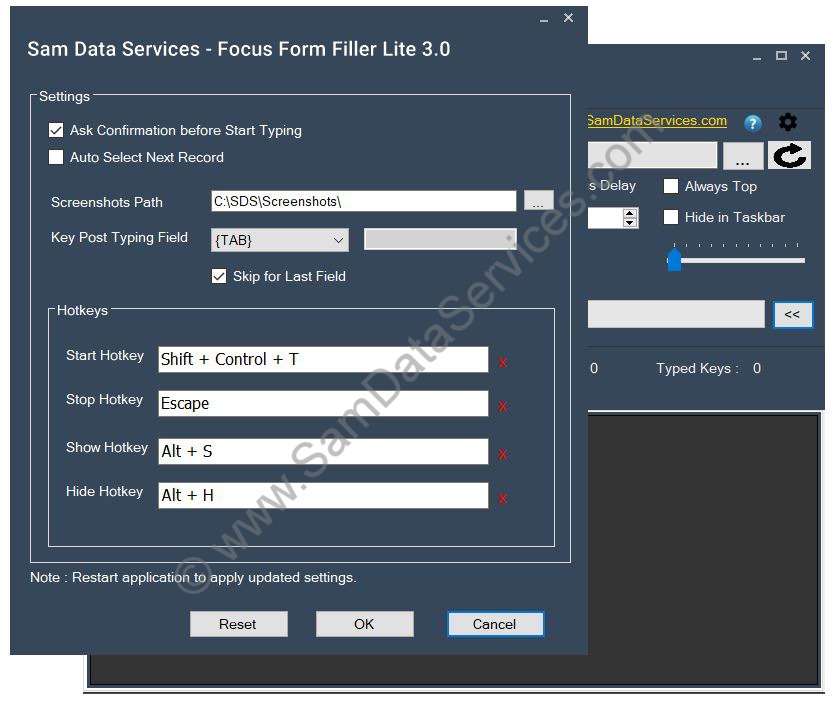
    • Settings form – user can access all settings at one place and change it as per the requirement
    Focus Form Filler Settings Form
    • Auto Select Next Record – auto select next record after completing currently selected record
    • Ask Confirmation before Start – allows user to skip auto fill start confirmation dialog window to reduce clicks
    • Manage hotkeys – Keyboard shortcut keys used to perform start/stop operations. Also allowed to show/hide the form filler on screen. user can change the hotkeys accordingly
    • Screenshots Folder Configuration – whenever form filler get screenshot input, it automatically saves at the configured location
    • Combination Keys Support – added support for Ctrl, Alt or Shift key combination

      If user wants to automate Ctrl/Alt/Shift key combination, this will also to use the same. For example,

      • {ctrl|a} : simulate Ctrl + a keypress
      • {ctrl|{Tab}} : simulate Ctrl + Tab keypress
    • Custom Keys Support – added support for custom keys like Pause, Save Screenshot
      • {Pause|n} : to pause for given seconds, eg:{pause|5} for 5secs, {pause|r} – random seconds between 1 and 10
      • {SAVEPRTSC} : automate capturing screenshot and saving it at the settings configured location
    • Key Post Typing Field – configurable key to simulate after typing a field/column of excel record, default key is Tab
    • Skip Key Post Typing Field – other than disabling column, user can also skip key post typing field for selected fields
    Disable Column Focus Form FIller
    • Preview Text – Allows user to preview the keys for the selected record
    • Format Text – shows the formatted keys and highlights the system and custom keys of selected record
    • Display Caps Lock on – displays if keyboard caps lock is on
    • Reset to defaults – reset all settings to default values
    • UI Improvements and Bug Fixes
      • Added Reload Icon to clear the data and reload the selected excel file
      • Fixed issues with loading xlsx file extension
      • Restoring grid column widths while shifting between the multiple excel sheets
      • Default backspace frequency to zero
      • Minor performance improvement bug fixes

    Updates in Focus Form Filler Lite 3.1:

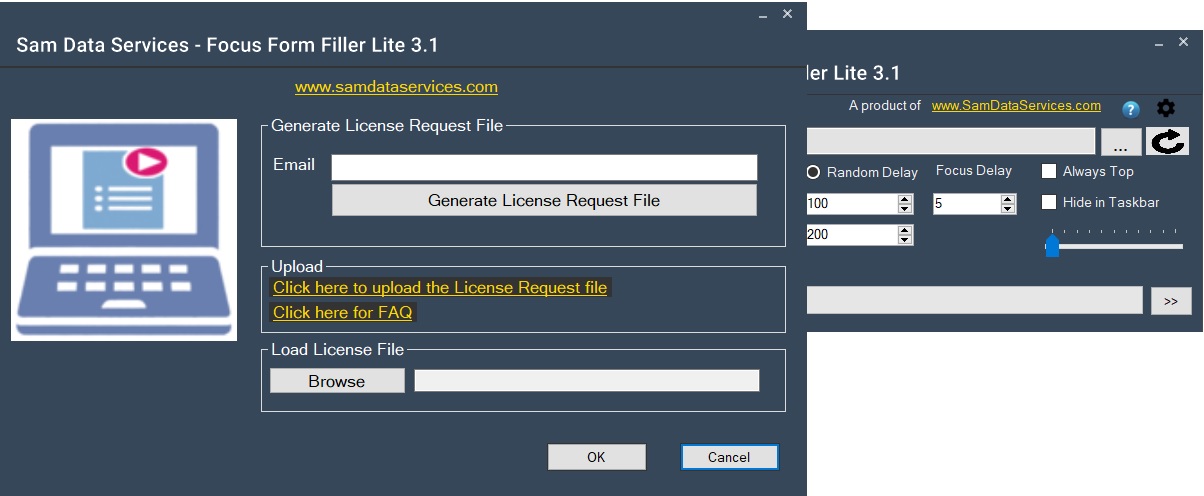
    Focus Form Filler Lite 3.1 version is released on 08-Jan-2025. This is a minor version upgrade with few code improvements

    • Allow Trail application to type 10 fields per every record
    • Improvements in reading Excel file for both .xls and .xlsx extensions