Author: samdataservices

  • How Google 360° Virtual Tours Increase School Admissions and Build Trust

    How Google 360° Virtual Tours Increase School Admissions and Build Trust

    Introduction

    In today’s digital-first world, a Google 360 virtual tour for schools is absolutely essential for making a powerful first impression. When parents look for the best institution for their child, they no longer primarily rely on paper brochures or word-of-mouth. Instead, they consistently use Google searches, read online reviews, and explore your digital presence. Consequently, a professional virtual tour allows you to showcase your entire campus online—from classrooms and labs to libraries and playgrounds—thereby creating a realistic, walk-through experience that makes your institution truly stand out.

    Why a Virtual Tour is Your 24/7 Open House

    This innovative technology is, in fact, revolutionizing how schools across India and the globe enhance admissions, establish trust, and ultimately lead in a competitive education market. Essentially, it’s like an open house that’s available 24/7, accessible from anywhere in the world. You can, for example, see precisely how it works by checking out our portfolio on our website.

    1. Create a Digital First Impression

    Most parents’ first impression of your school happens online – either through your website (if you have one) or, more often, your Google listing. Therefore, a Google 360 virtual tour for schools immediately sets you apart by:

    • Creating a rich, immersive experience that static photos cannot match.
    • Allowing parents and students to “walk” your campus from their mobile, or desktop.
    • Establishing an emotional connection before they step through the gates.
    • Real Instance: A school in Hyderabad saw a 50% increase in inquiries three months after adding a Google Virtual Tour to their listing. You can view a gallery of our Completed tours on our website @samdataservices.com
    google 360 virtual tours

    2.Cultivate Trust with Parents Prior to Visiting

    For parents, the choice of a school is certainly not merely an academic one; they are deeply concerned about safety, cleanliness, infrastructure, and atmosphere. A virtual tour demonstrably shows you have nothing to hide and, consequently, offers the opportunity to answer key questions without the immediate need for an in-person appointment. This unparalleled transparency thus provides:

    • Increase Admissions with a Competitive Advantage
    • We all know every parent will compare and contrast other schools before making a decision. A Google 360° Virtual Tour achieves many things:
    • Your listing now stands out in Google Search & Maps
    • Parents spend more time exploring your listing
    • Schools with a tour receive up to 30% more clicks than those without

    3. Showcase What Makes Your School Unique-

    With a virtual tour, you have the ability to showcase particular areas of your campus that you would like to highlight (and are proud of). This includes-

    • Spacious classrooms
    • Library, state-of-the-art
    • Arena for sports (indoor/outdoor)
    • Classrooms for science and computer labs
    • Dining halls that are clean or hygienic
    • Activity areas for art, or music

    “A virtual tour brings these spaces to life, ensuring parents and students get a complete picture of the school’s offerings.”

    Allowing parents to explore at their own leisure, Reducing repetitive requests for infrastructure inquiries, Enabling your team to spend more effort on quality walk-ins, instead of mere curiosity.

    google 360 office virtual tour

    4. Improve Your Overall Digital Strategy

    Campus visits are key but they take time and are not always possible for out-of-town staff and parents. A 360° tour provides support by-

    • Embed the tour on your homepage, admissions page, and contact page to increase the on-site time that benefits your SEO.
    • Share the link on Instagram, Facebook, and WhatsApp for more friends to interact with the tour.
    • Increase the value of your Google Maps listing, elevating the rank of your site in local search results for “top schools near me.”

    Conclusion- “A Smart Investment to Secure Your School’s Digital Future

    A Google 360° Virtual Tour is more than a flashy feature it is a strategic investment in your school’s visibility, credibility, and future growth. If you are a school administrator or marketing head in Hyderabad or anywhere in India, Sam Data Services can help you create a professional virtual tour that drives results.

    Let’s Digitize Your School – Start Now Are you ready to showcase your campus online?

    Visit our website to learn more about our process or contact Sam Data Services today to schedule a free consultation and see how we can help your school digitally come alive. @samdataservices

  • Focus Map Scraper Install Guide 2025 (Free Chrome Extension)

    Focus Map Scraper Install Guide 2025 (Free Chrome Extension)

    Looking to extract business leads from Google Maps automatically? Focus Map Scraper is a powerful Chrome extension that extracts business data, contact information, and leads from Google Maps without API limitations. This guide will walk you through the complete installation process in under 5 minutes.

    Enjoy the ease of automated lead extraction with our simple yet powerful software that includes features to make your workflow even easier.

    What is Focus Map Scraper?

    Focus Map Scraper is a free Chrome extension that automates Google Maps data extraction. The tool extracts unlimited contacts, emails, and business details without API limitations, making it perfect for:

    • Lead generation for sales teams
    • Market research for businesses
    • Competitor analysis for marketing
    • Local business data for directories

    Start extracting leads today with our free version.”You can still upgrade your subscription for premium features later”

    Focus Map Scraper Chrome Extension Installation Steps:

    Download Focus Map Scraper from our website

    • Click here Click here to be redirected to the Focus Map Scraper product page, click the “Download” button as highlighted in the image below. You will be redirected to the Download page.
    • Complete the Name, Email and Country area as depicted below, then click on the Download Button. This should produce a standard downloaded zip file that contains files for the extension.
    focus map scraper download

    Unzip the file and Locate the extension files folder

    • Find the ZIP file: Locate the ZIP file that you downloaded on your computer (typically in your Downloads folder).
    • Extract the files:Right click on the ZIP file and then select “Extract All” (or something similar). Choose a location on your computer to extract the files to (e.g. your Desktop or dedicated folder).
    • Find the installation folder: After you extracted the ZIP folder, you will need to open the folder that you extracted the files to.
    focus map scraper extract zip
    copy folder path after extracting

    Open Chrome extensions and Switch on the developer mode

    • Open the Google Chrome browser.
    • In the address bar, type chrome://extensions/ and hit Enter or click on the 3 dots button in the right corner of Google Chrome icon.
    • Turn on “Developer mode” in chrome://extensions/
    • Then, Click “Load unpacked” and select the folder that contained focus-map-scraper .

    Step 4: Install extension, pin the extension to get access

    • Load unpacked: Click on the “Load unpacked” button.
    • Select the extension folder: In the window that opens up in your file explorer, navigate to and select the folder containing the Focus Map Scraper files.
    • Pin the extension: After you successfully load the extension, you can pin it for quick and easy access. Click on the Pin icon (looks like a pushpin) located next to the extension.
    • This will allow addition of the extension to the Chrome toolbar
    Load the unpacked extension
    Activate the extension
    Pin the extension

    Ready to use:
    It’s time to start using the Focus Map Scraper You should now see the Focus Map Scraper icon in the toolbar of your Chrome web browser. Click on the icon to open the extension and start using it for web scraping.

    “Grow your business with premium features, new releases, and support with subscription flexibility.”

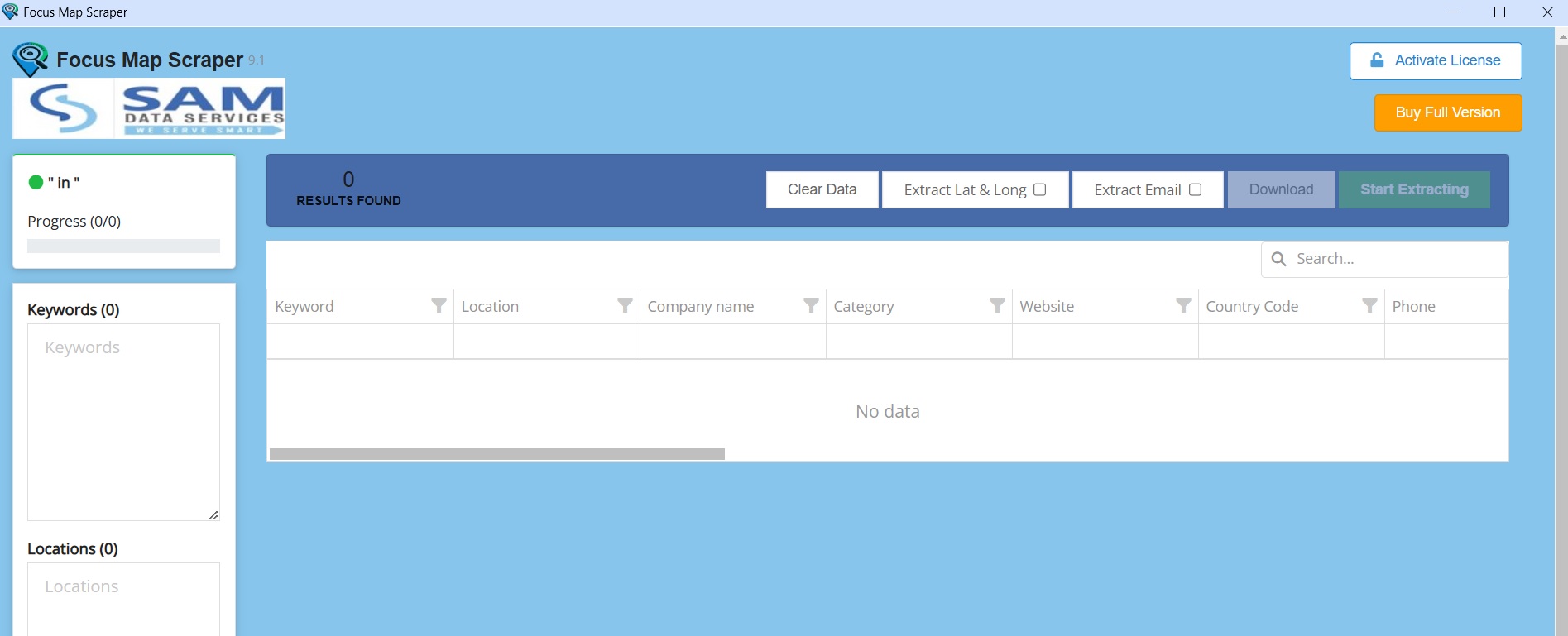
    Your Focus Map Scraper Chrome Extension installation is complete, and the image shot below shows the software interface.

    Focus Map Scraper interface

    “We’re committed to provide you with the best possible products.”

    If any queries arise, you can be contact us through email at samdataservices(at)gmail.com or by filling out the contact form.

  • Announcing Focus Form Filler Lite 3.0 free download

    Announcing Focus Form Filler Lite 3.0 free download

    Announcing the release of Focus Form Filler Lite 3.0. It is a software used to automate form filling in any desktop or web application. It is an excel to form filling software which take input from excel file and instantly fills simple forms through automation.

    We are constantly working on improving software with updates and new features. For customers and end-users of our product, newly developed features can provide added value and empower them to become even more productive. Most of our clients use this software for form filling data entry and to automate repetitive form filling tasks, hence we added more features to help them to do more of automation. We have introduced some new features like automating combination keys, custom keys. And hotkeys feature goes more handy to access application with shortcut keys.

    The preceding version of this software is Focus Form Filling Auto Typer 2.1

    What’s new in Focus Form Filler Lite 3.0 ?

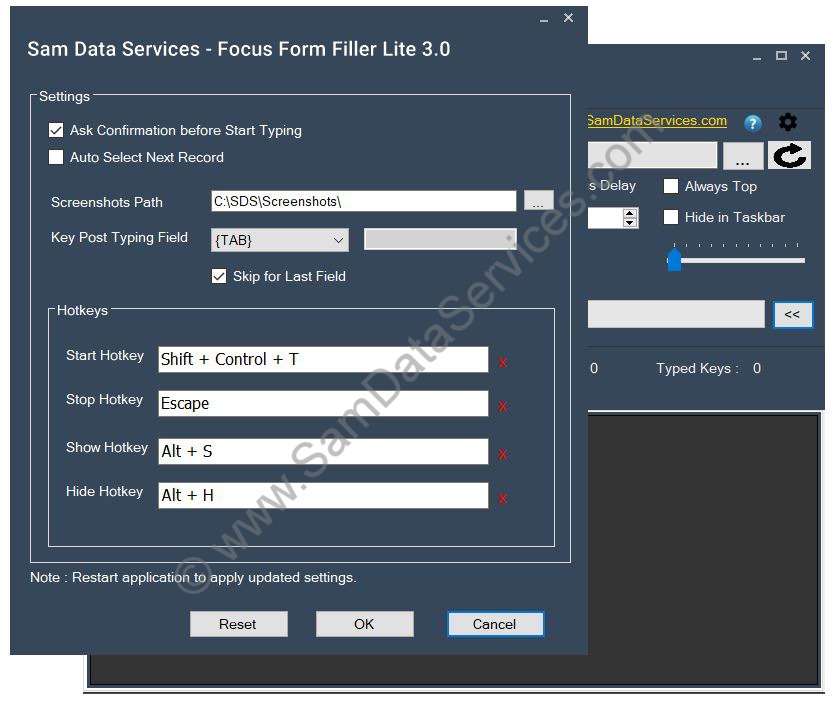
    • Settings form – user can access all settings at one place and change it as per the requirement
    Focus Form Filler Settings Form
    • Auto Select Next Record – auto select next record after completing currently selected record
    • Ask Confirmation before Start – allows user to skip auto fill start confirmation dialog window to reduce clicks
    • Manage hotkeys – Keyboard shortcut keys used to perform start/stop operations. Also allowed to show/hide the form filler on screen. user can change the hotkeys accordingly
    • Screenshots Folder Configuration – whenever form filler get screenshot input, it automatically saves at the configured location
    • Combination Keys Support – added support for Ctrl, Alt or Shift key combination

      If user wants to automate Ctrl/Alt/Shift key combination, this will also to use the same. For example,

      • {ctrl|a} : simulate Ctrl + a keypress
      • {ctrl|{Tab}} : simulate Ctrl + Tab keypress
    • Custom Keys Support – added support for custom keys like Pause, Save Screenshot
      • {Pause|n} : to pause for given seconds, eg:{pause|5} for 5secs, {pause|r} – random seconds between 1 and 10
      • {SAVEPRTSC} : automate capturing screenshot and saving it at the settings configured location
    • Key Post Typing Field – configurable key to simulate after typing a field/column of excel record, default key is Tab
    • Skip Key Post Typing Field – other than disabling column, user can also skip key post typing field for selected fields
    Disable Column Focus Form FIller
    • Preview Text – Allows user to preview the keys for the selected record
    • Format Text – shows the formatted keys and highlights the system and custom keys of selected record
    • Display Caps Lock on – displays if keyboard caps lock is on
    • Reset to defaults – reset all settings to default values
    • UI Improvements and Bug Fixes
      • Added Reload Icon to clear the data and reload the selected excel file
      • Fixed issues with loading xlsx file extension
      • Restoring grid column widths while shifting between the multiple excel sheets
      • Default backspace frequency to zero
      • Minor performance improvement bug fixes

    Updates in Focus Form Filler Lite 3.1:

    Focus Form Filler Lite 3.1 version is released on 08-Jan-2025. This is a minor version upgrade with few code improvements

    • Allow Trail application to type 10 fields per every record
    • Improvements in reading Excel file for both .xls and .xlsx extensions
  • Bulk Txt to Doc Converter Software Free Download

    Bulk Txt to Doc Converter Software Free Download

    We are announcing the release of Bulk Txt to Doc Converter Software. It is a software to convert batch notepad(*.txt) files to Word files. It supports both extensions of word that is doc and docx. This software is very user friendly and easy to use. Download the free version and give it a try.

    This software offers 2 options, txt to doc converter and vice-versa.

    Bulk Convert Txt to Word files

    This feature allows user to convert bulk txt to doc files in a single click. The steps given below

    1. Run Text to Word Converter
    2. Select input and output folders
    3. select Save As Type, either doc or docx extension
    4. Click on Process button and your files will converted.
    txt-to-word-files
    Converting bulk txt files to ms word files

    Bulk Convert Word to Txt files

    This feature allows user to batch convert doc to txt files. The steps are given below

    1. Run Text to Word Converter Software
    2. Select input and output folders
    3. Select encoding type for txt file from the available dropdown
    4. Convert all word to txt on process button click
    word-to-txt-files
    converting bulk ms word files to notepad(*.txt) files

    How to get Txt to Doc converter Software License File?

    1. Download Text to Word Converter Software from here.

    2. Install the software and run it, you will see the License activation window as shown below

    Text to Doc Converter activation window

    3. In the Activation window, enter your email address and click on Generate License Request File. The license request file will be generated and it can be saved at your desired location. The generated license request file will be saved with .sdsr extension.

    Text to Word Converter License Request

    4. After creating license request file, complete the payment through UPI or PayPal, details are available here

    5. Upload the license request file and payment proof at https://www.samdataservices.com/buy.aspx

    6. On submitting a valid request file and payment proof, you will receive an email with License File(.sdsx extension) attached to it. Typically it may take 2-4hrs for receiving an email with license.

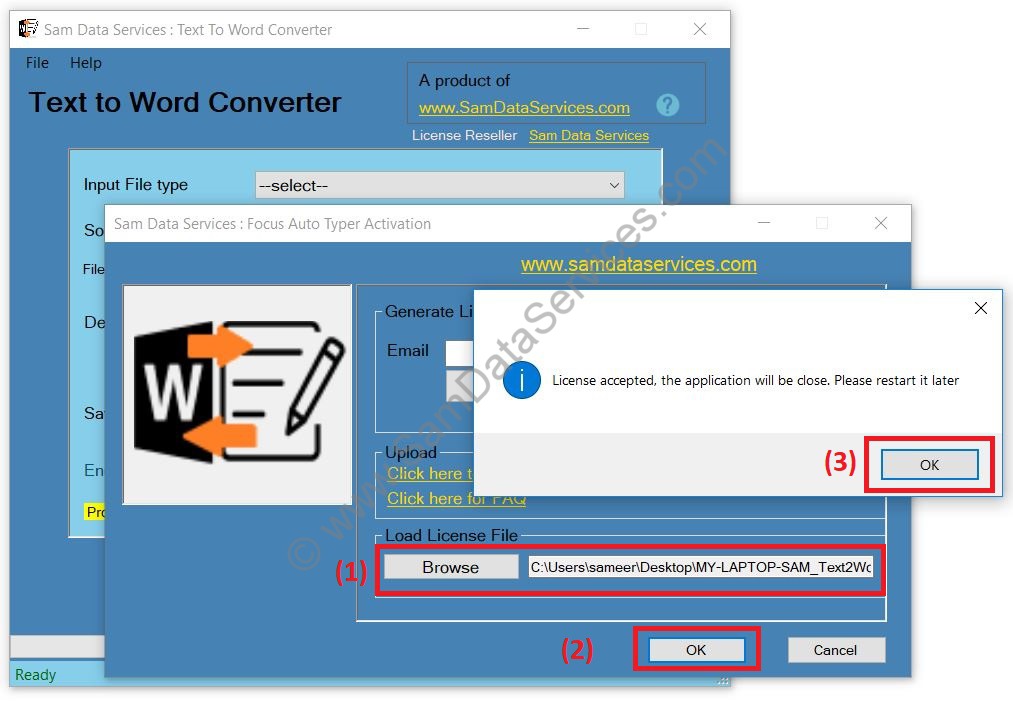
    7. Download License file and browse it on Activation window

    Text to Word Converter License file
    • Restart the software and use the full version

    Any queries can be raised through contact form

  • Announcing Focus Auto Typer Pro 4.0 release

    Announcing Focus Auto Typer Pro 4.0 release

    We are happy to announce the release of Focus Auto Typer Pro 4.0. It is an automatic typing software which simulate keyboard strokes and automates typing process for your data entry job. Download the free version and try it today.

    We are constantly working on improving software with updates and new features. For customers and end-users of our product, newly developed features can provide added value and empower them to become even more productive. Most of our clients do work on data entry, hence we added more features to help them in achieving more accuracy. We have introduced some new features like Spell Check through dictionary, supporting more file types and hotkeys feature goes more handy to access application with shortcut keys.

    The preceding version of this software is 3.1.

    What’s new in Focus Auto Typer Pro 4.0 ?

    • Multiple files support – Earlier versions used to support only text/word files, now it also supports text/word/pdf/html file to load text
    focus-auto-typer-multiple-file-type-support
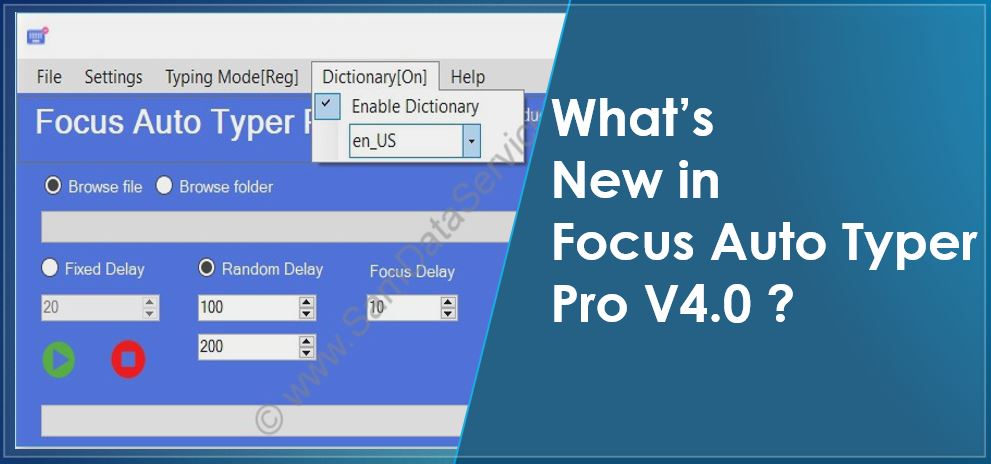
    • Enable Dictionary – Enabling the dictionary performs the spell check and non dictionary words will be red underlined. user can choose from the list of available dictionary as well
    focus-auto-typer-enable-dictionary
    • Manage hotkeys – Keyboard shortcut keys used to perform play/pause/resume operations. Also allowed to show/hide the auto typer on screen. user can change the hotkeys accordingly
    focus-auto-typer-manage-hotkeys
    • Display caps lock on – displays if caps lock is on
    • Minimize to tray – software can minimized to system tray instead of taskbar
    • Reset to defaults – reset all settings to default
    • Minor UI Improvements – Added line numbers toggle Icon, caret position display and some minor UI improvements and bug fixes

    Click here for complete details and pricing of focus autotyper software. To know the steps of purchasing a license, visit the article Steps get Focus Auto Typer License File / Key

    Upgrade to 4.0:

    New users has to purchase a license but if you are an existing customer with older version, you can apply for upgrade to 4.0. Please contact us for upgrade help.

  • Free Automatic Typing Software | Focus AutoTyper Lite

    “Looking for a free auto typing software to get rid of tedious manual typing work?”. Here we have a solution to your problem. We have released a free automatic typing software, Focus Auto Typer Lite and it is now available for download. This software allows you to automate unlimited typing through keyboard key stroke simulation.

    What is Focus Auto Typer Lite Software ?

    • It is a freeware software utility to automate keyboard for typing.
    • It allows to Auto Type text into any application including copy paste disabled application.

    How it works ?

    • Open Focus Auto Typer Lite, Load notepad file or paste text into the Auto Typer.
    • Click on start button and place the cursor in client application, it will start typing automatically.

    Screenshots of Focus Auto Typer Lite

    Free Automatic Typing Screenshot1
    Free Automatic Typing Focus Auto typer Lite Screenshot2

    Why should you use Free Automatic Typing Software?

    Below are the few use cases of auto typer

    • For typing the repetitive text as it saves your time
    • Auto typing text into copy paste disabled application as it saves your manual work
    • Data entry automation in cases where automation is allowed

    Download Focus Auto Typer Lite for free and give it a try. It is 100% free and it supports unlimited text typing.

    This is one of the best freeware automatic typing software. It types with 100% accuracy. The video below shows the working demo and usage of the software.

    Upgrade from Focus auto typer Lite to Focus auto typer Pro :

    Focus Auto Typer Lite is a freeware software with limited features. For more features like modulating your typing speed and including random backspaces with frequency selection etc.., you can use the Focus Auto Typer Pro. The latest pro version is Focus Auto Typer 4.0 and its trail version is available for download. We provide full support for the pro version users. To get license for this Pro version visit the link

  • Focus AutoTyper 3.1 Software Free Download

    Focus AutoTyper 3.1 Software Free Download

    Focus AutoTyper 3.1 free download is available. It is an advanced automatic typing software. It takes notepad/word file as input and simulate keyboard key strokes to auto type in any copy/paste disabled data entry application.

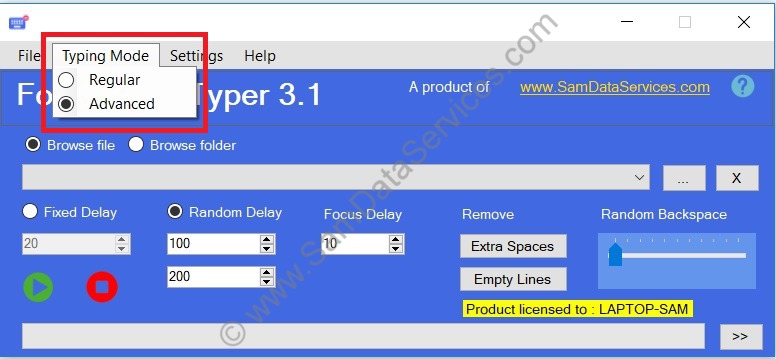
    Focus AutoTyper previous versions support autotyping in any application. There are few applications like Notepad RTX++ which doesn’t allow auto typing. We are releasing Focus Auto Typer 3.1 and introducing an Advanced Typing Mode feature to support such applications. The preceding version of software is 3.0.

    Focus Auto Typer 3.1 New Features :

    • Typing Mode
      • Regular – supports auto typing in almost any application
      • Advanced – try this if Regular option does not work

    Focus AutoTyper 3.1 application has all the features of 3.0 including given new features. The screenshot below shows the Typing Mode option introduced

    focus auto typer 3.1

    Click here for complete details and pricing of focus autotyper software. To know the steps of purchasing a license, visit the article Steps get Focus Auto Typer License File / Key

    Upgrade from Focus auto typer 3.0 to Focus auto typer 3.1 :

    Users with valid license for Focus auto typer 3.0 can use the same license file for Focus auto typer 3.1. We recommend our customers upgrade from version 3.0 to 3.1 and utilize the new feature.

  • How to Get Focus Auto Typer License Key-Remove 100 Letter Limit

    How to Get Focus Auto Typer License Key-Remove 100 Letter Limit

    Focus auto typer software is available for free download. It is free to try all the features of software. The only limitation in free version is that it allows only 100 letters of text. If you want to auto type unlimited text using focus auto typer, you need a valid license. To know more about software usage, click here. Below are the steps to get focus auto typer license file/key. The steps are same for Focus Form Filling auto typer as well.

    Why You Need a Focus Auto Typer License

    Free Version Limitations:
    • 100-letter text limit per session
    • All features available for testing
    • Perfect for evaluating the software

    Licensed Version Benefits:

    • Unlimited text automation
    • No character restrictions
    • Full professional features
    • Priority email support
    • Lifetime software updates

    Steps to get focus auto typer license file:

    1. Download focus auto typer from here.

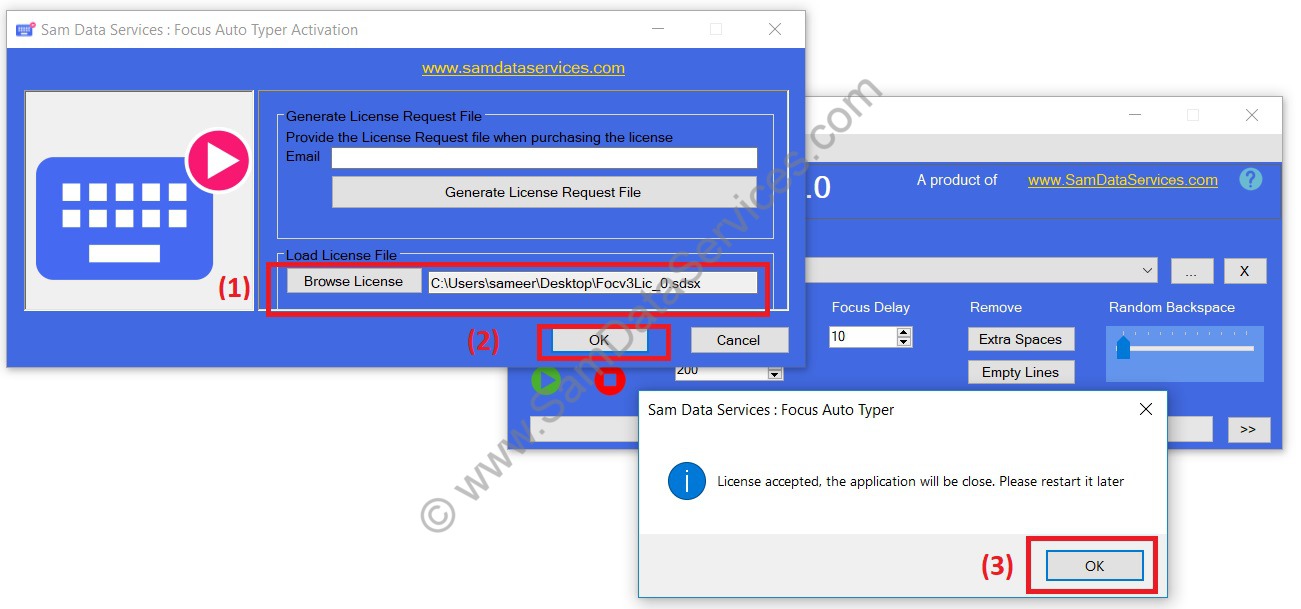
    2. Install the software and run it, you will see the License activation window as shown below

    focus-auto-typer-activation

    3. In the Activation window, enter your email address and click on Generate License Request File. The license request file will be generated and it can be saved at your desired location. The generated license request file will be saved with .sdsr extension.

    focus auto typer license request

    4. Complete the payment through UPI(for Indian payments) or PayPal(for international payments), details are available here.

    5. Submit the License Request file and payment proof screenshot at http://www.samdataservices.com/buy.aspx

    6. On submitting a valid request file and payment proof, you will receive an email with License File(.sdsx extension) attached to it. Typically it may take 2-4hrs for receiving an email with license.

    7. Download the License file and browse it on activation window.

    focus-auto-typer-3.0-license-activation

    8. Restart the focus auto typer software and use the full version.

    Your Focus Auto Typer license key unlocks powerful automation capabilities. Follow this guide to activate unlimited text processing and transform your typing workflow today.

    If you have any queries, please contact us through email, samdataservices@gmail.com or fill the contact form

  • USING FOCUS AUTO TYPER FOR IMAGE TO TEXT DATA ENTRY

    USING FOCUS AUTO TYPER FOR IMAGE TO TEXT DATA ENTRY

    WHAT IS FOCUS AUTO TYPER?

    Focus Auto Typer is an advanced automatic typing software. It automates typing process for your data entry job. The auto typer simulates keyboard strokes to type anywhere. Hence, it can be used to transfer text to any client software. Such as MF Notepad, OGS Notepad App, Marlive Notepad, Notepad RT++. EBook Notepad, Hub Notepad, Agent, Agent8, Text Editor, any version of Image to typing etc.

    WHEN TO USE ?

    • Focus Auto typer can be used in Image to Text data entry projects. Where client provides you with the image data and also their own notepad application.
    • As the manual typing is difficult, you may convert your images to text.
    • Image to text conversion can be done using OCR/ICR software(if you have), else can also get it done by the data conversion service providers in the market.
    • Therefore the image to text conversion is complete, proof reading is to be done to correct any sort of mistakes.
    • If the client has provided notepad application with copy/paste option disabled, this application enables you to automate your typing.
    • Here you can use Focus Autotyper to automatically type text in the client’s notepad. It takes the text or word file as an input and types it on any notepad application.
    • In this complete process we are automating the keyboard to type. Click on start and typing starts automatically at the cursor.

    Note: We at Sam Data Services also provide Image to Text Conversion Services.

    HOW TO USE ?

    Focus auto typer software completely automates the typing. The text you provide in the auto typer starts to type to any client notepad application. This process is the same with any software.

    Focus autotyper provides with options such as:

    • Select multiple files

      Application allows user to select multiple files or to select folder (with sub folders)

    • Fixed delay :

      The typing will be done with a constant speed. User can adjust the typing speed with change in value (milli-seconds).

    • Random delay :

      In Random delay, user can set a preferred range of delay values for eg.100-200(milli-seconds). Now each character will gets typed with random speed between the given ranges. If client application is tracking your typing speed, random delay option is highly recommended.

    • Random Back Space track bar

      This option inserts random back space while typing. It gives the impression of manually work.

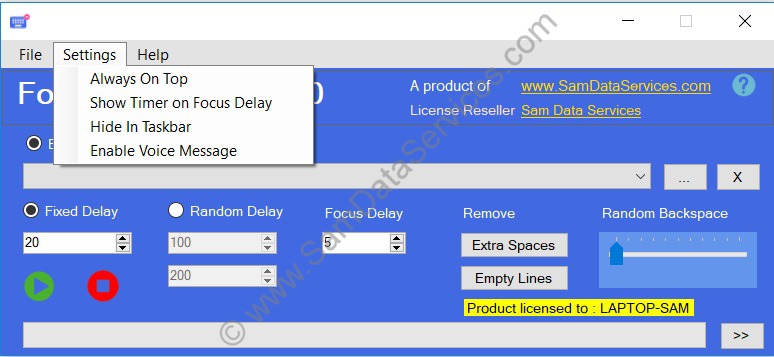
    • Always Top

      This option allows you to keep autotyper window always on top of client application

    • Hide In Taskbar

      It allows to hide the software icon in taskbar pane

    • Enable Voice Message

      On its selection, software gives a voice message on completion of typing process.

    • Remove Extra Spaces

      You can remove double or extra spaces in text.

    • Remove Empty Lines

      You can remove the empty lines from the text.

    WHY SHOULD YOU CHOOSE FOCUS AUTO TYPER?

    • With all the features listed above, it becomes the more advanced software which uses keyboard strokes and random speed (on selection). It hardens the client to detect automation.
    • It has very user friendly interface allowing user to the expand/collapse window size.
    • While some third party software won’t allow user to perform other operations on desktop. Our application will display above the client application window on Always Top selection.
    • It also works well with special characters.
    • Focus auto typer is available for free download. The major advantage is that, you can download the application here and try all the features.
    • The only restriction in trail version is it allows 100 letters/characters only. After purchasing license, it allows unlimited text.
    • We recommend you to watch the demo video given below.
  • Focus Auto Typer 3.0 Software Available For Free Download

    Focus Auto Typer 3.0 Software Available For Free Download

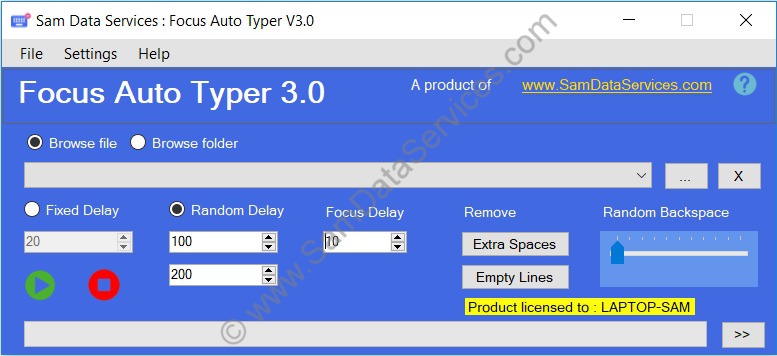
    Focus Auto Typer is an automatic typing software. It automates typing process for your data entry job. It takes text as input(*.txt/*.doc/*.docx file) and uses keyboard key strokes to type in any copy/paste disabled data entry application.

    We have released Focus auto typer 3.0 with added new features, minor bug fixes and performance improvements. The preceding version was focus auto typer 2.1

    New Features:

    • User interface updated
    • Drag drop selection of multiple files and folders
    • Easy file selection from drop-down
    • Random backspace frequency selection
    • Enable voice message
    • Hide in taskbar option
    • Show timer on focus delay
    focus-auto-typer-3.0-screen1
    Focus Auto Typer 3.0
    Focus Auto Typer 3.0 Screenshots
    Focus Auto Typer Screen3