Tag: Focus auto typer

  • Focus AutoTyper 3.1 Software Free Download

    Focus AutoTyper 3.1 Software Free Download

    Focus AutoTyper 3.1 free download is available. It is an advanced automatic typing software. It takes notepad/word file as input and simulate keyboard key strokes to auto type in any copy/paste disabled data entry application.

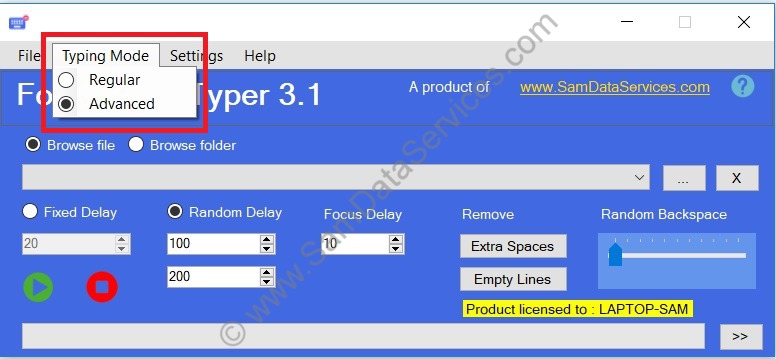
    Focus AutoTyper previous versions support autotyping in any application. There are few applications like Notepad RTX++ which doesn’t allow auto typing. We are releasing Focus Auto Typer 3.1 and introducing an Advanced Typing Mode feature to support such applications. The preceding version of software is 3.0.

    Focus Auto Typer 3.1 New Features :

    • Typing Mode
      • Regular – supports auto typing in almost any application
      • Advanced – try this if Regular option does not work

    Focus AutoTyper 3.1 application has all the features of 3.0 including given new features. The screenshot below shows the Typing Mode option introduced

    focus auto typer 3.1

    Click here for complete details and pricing of focus autotyper software. To know the steps of purchasing a license, visit the article Steps get Focus Auto Typer License File / Key

    Upgrade from Focus auto typer 3.0 to Focus auto typer 3.1 :

    Users with valid license for Focus auto typer 3.0 can use the same license file for Focus auto typer 3.1. We recommend our customers upgrade from version 3.0 to 3.1 and utilize the new feature.

  • How to Get Focus Auto Typer License Key-Remove 100 Letter Limit

    How to Get Focus Auto Typer License Key-Remove 100 Letter Limit

    Focus auto typer software is available for free download. It is free to try all the features of software. The only limitation in free version is that it allows only 100 letters of text. If you want to auto type unlimited text using focus auto typer, you need a valid license. To know more about software usage, click here. Below are the steps to get focus auto typer license file/key. The steps are same for Focus Form Filling auto typer as well.

    Why You Need a Focus Auto Typer License

    Free Version Limitations:
    • 100-letter text limit per session
    • All features available for testing
    • Perfect for evaluating the software

    Licensed Version Benefits:

    • Unlimited text automation
    • No character restrictions
    • Full professional features
    • Priority email support
    • Lifetime software updates

    Steps to get focus auto typer license file:

    1. Download focus auto typer from here.

    2. Install the software and run it, you will see the License activation window as shown below

    focus-auto-typer-activation

    3. In the Activation window, enter your email address and click on Generate License Request File. The license request file will be generated and it can be saved at your desired location. The generated license request file will be saved with .sdsr extension.

    focus auto typer license request

    4. Complete the payment through UPI(for Indian payments) or PayPal(for international payments), details are available here.

    5. Submit the License Request file and payment proof screenshot at http://www.samdataservices.com/buy.aspx

    6. On submitting a valid request file and payment proof, you will receive an email with License File(.sdsx extension) attached to it. Typically it may take 2-4hrs for receiving an email with license.

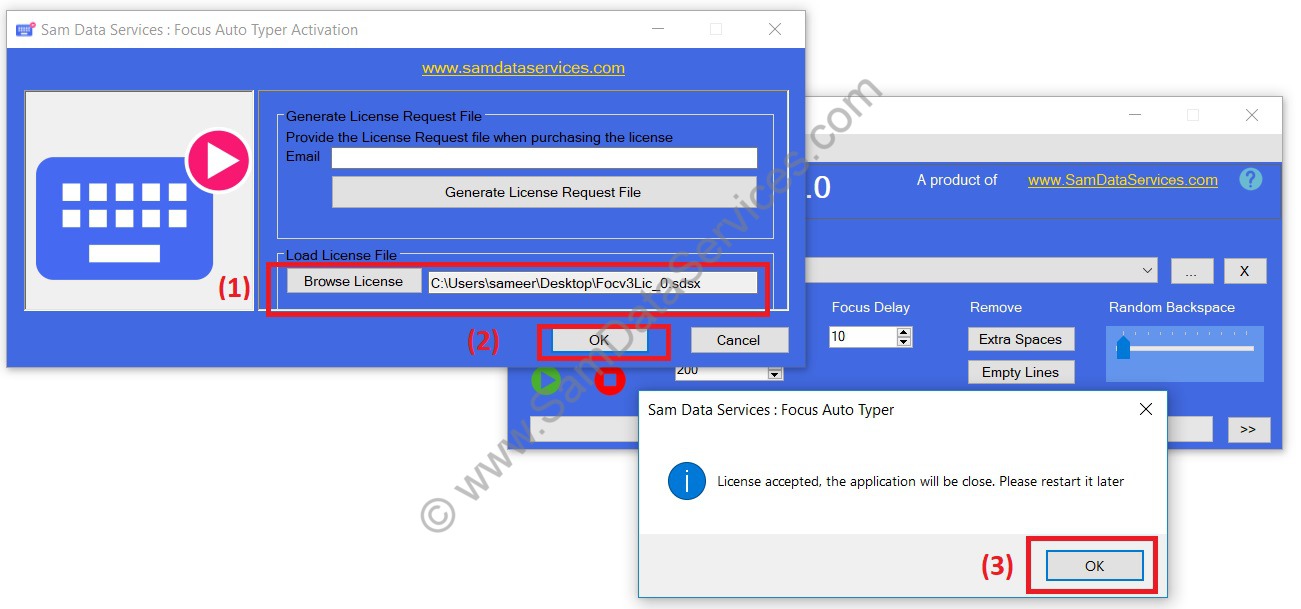
    7. Download the License file and browse it on activation window.

    focus-auto-typer-3.0-license-activation

    8. Restart the focus auto typer software and use the full version.

    Your Focus Auto Typer license key unlocks powerful automation capabilities. Follow this guide to activate unlimited text processing and transform your typing workflow today.

    If you have any queries, please contact us through email, samdataservices@gmail.com or fill the contact form

  • USING FOCUS AUTO TYPER FOR IMAGE TO TEXT DATA ENTRY

    USING FOCUS AUTO TYPER FOR IMAGE TO TEXT DATA ENTRY

    WHAT IS FOCUS AUTO TYPER?

    Focus Auto Typer is an advanced automatic typing software. It automates typing process for your data entry job. The auto typer simulates keyboard strokes to type anywhere. Hence, it can be used to transfer text to any client software. Such as MF Notepad, OGS Notepad App, Marlive Notepad, Notepad RT++. EBook Notepad, Hub Notepad, Agent, Agent8, Text Editor, any version of Image to typing etc.

    WHEN TO USE ?

    • Focus Auto typer can be used in Image to Text data entry projects. Where client provides you with the image data and also their own notepad application.
    • As the manual typing is difficult, you may convert your images to text.
    • Image to text conversion can be done using OCR/ICR software(if you have), else can also get it done by the data conversion service providers in the market.
    • Therefore the image to text conversion is complete, proof reading is to be done to correct any sort of mistakes.
    • If the client has provided notepad application with copy/paste option disabled, this application enables you to automate your typing.
    • Here you can use Focus Autotyper to automatically type text in the client’s notepad. It takes the text or word file as an input and types it on any notepad application.
    • In this complete process we are automating the keyboard to type. Click on start and typing starts automatically at the cursor.

    Note: We at Sam Data Services also provide Image to Text Conversion Services.

    HOW TO USE ?

    Focus auto typer software completely automates the typing. The text you provide in the auto typer starts to type to any client notepad application. This process is the same with any software.

    Focus autotyper provides with options such as:

    • Select multiple files

      Application allows user to select multiple files or to select folder (with sub folders)

    • Fixed delay :

      The typing will be done with a constant speed. User can adjust the typing speed with change in value (milli-seconds).

    • Random delay :

      In Random delay, user can set a preferred range of delay values for eg.100-200(milli-seconds). Now each character will gets typed with random speed between the given ranges. If client application is tracking your typing speed, random delay option is highly recommended.

    • Random Back Space track bar

      This option inserts random back space while typing. It gives the impression of manually work.

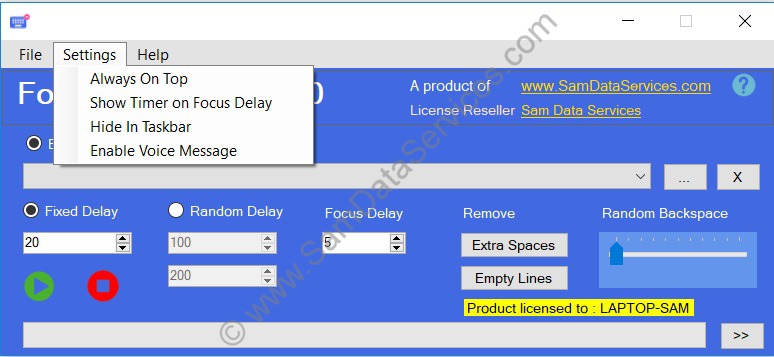
    • Always Top

      This option allows you to keep autotyper window always on top of client application

    • Hide In Taskbar

      It allows to hide the software icon in taskbar pane

    • Enable Voice Message

      On its selection, software gives a voice message on completion of typing process.

    • Remove Extra Spaces

      You can remove double or extra spaces in text.

    • Remove Empty Lines

      You can remove the empty lines from the text.

    WHY SHOULD YOU CHOOSE FOCUS AUTO TYPER?

    • With all the features listed above, it becomes the more advanced software which uses keyboard strokes and random speed (on selection). It hardens the client to detect automation.
    • It has very user friendly interface allowing user to the expand/collapse window size.
    • While some third party software won’t allow user to perform other operations on desktop. Our application will display above the client application window on Always Top selection.
    • It also works well with special characters.
    • Focus auto typer is available for free download. The major advantage is that, you can download the application here and try all the features.
    • The only restriction in trail version is it allows 100 letters/characters only. After purchasing license, it allows unlimited text.
    • We recommend you to watch the demo video given below.
  • Focus Auto Typer 3.0 Software Available For Free Download

    Focus Auto Typer 3.0 Software Available For Free Download

    Focus Auto Typer is an automatic typing software. It automates typing process for your data entry job. It takes text as input(*.txt/*.doc/*.docx file) and uses keyboard key strokes to type in any copy/paste disabled data entry application.

    We have released Focus auto typer 3.0 with added new features, minor bug fixes and performance improvements. The preceding version was focus auto typer 2.1

    New Features:

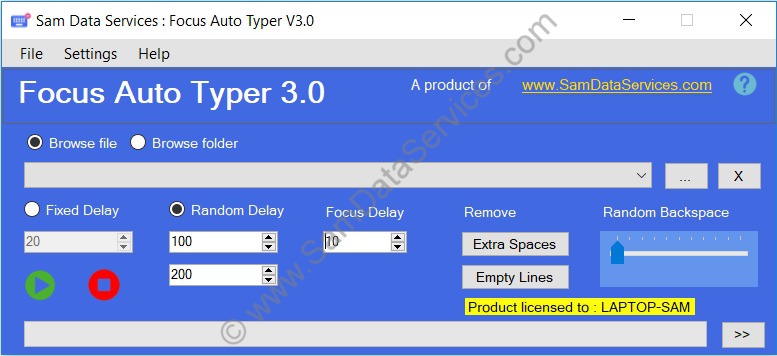
    • User interface updated
    • Drag drop selection of multiple files and folders
    • Easy file selection from drop-down
    • Random backspace frequency selection
    • Enable voice message
    • Hide in taskbar option
    • Show timer on focus delay
    focus-auto-typer-3.0-screen1
    Focus Auto Typer 3.0
    Focus Auto Typer 3.0 Screenshots
    Focus Auto Typer Screen3

  • Announcing Focus Auto Typer 2.1 available for download

    Announcing Focus Auto Typer 2.1 available for download

    We have released Focus auto typer 2.1. We have added some new features and minor bug fixes in the preceding version Focus auto typer 2.0.

    Download Focus auto typer 2.1 right now and give it a try.

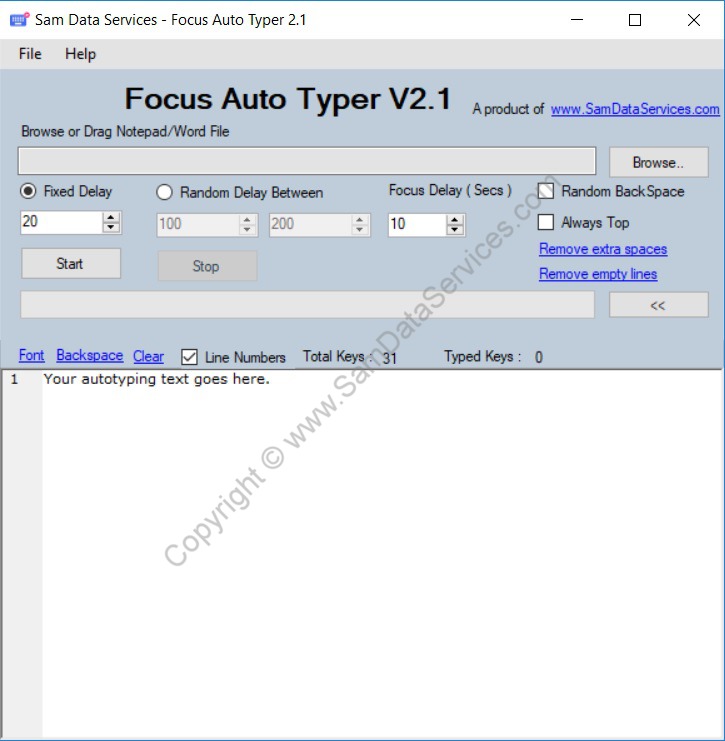
    Focus Auto Typer 2.1 updates :

    • Browse Ms word files(*.docx and *.doc) support to load text into text editor.
    • Drag and drop file feature also updated to support the same file formats as per browse file.
    • Remove empty spaces feature, to remove all the extra spaces in the text editor. It replace double or more spaces with single space.
    • Remove empty lines feature, to remove all the empty lines in the text editor.

    focus auto typer 2.1

    Upgrading from Focus auto typer 2.0 to Focus auto typer 2.1 :

    Those who have the license for Focus auto typer 2.0 can use the same license file for Focus auto typer 2.1. Hence we request the existing customers to upgrade with version 2.1.

    Hope our customers will like the new features and we are planning more features in the upcoming versions. If you want to suggest any new features, write us at email or contact.