Tag: sam data services

  • Bulk Txt to Doc Converter Software Free Download

    Bulk Txt to Doc Converter Software Free Download

    We are announcing the release of Bulk Txt to Doc Converter Software. It is a software to convert batch notepad(*.txt) files to Word files. It supports both extensions of word that is doc and docx. This software is very user friendly and easy to use. Download the free version and give it a try.

    This software offers 2 options, txt to doc converter and vice-versa.

    Bulk Convert Txt to Word files

    This feature allows user to convert bulk txt to doc files in a single click. The steps given below

    1. Run Text to Word Converter
    2. Select input and output folders
    3. select Save As Type, either doc or docx extension
    4. Click on Process button and your files will converted.
    txt-to-word-files
    Converting bulk txt files to ms word files

    Bulk Convert Word to Txt files

    This feature allows user to batch convert doc to txt files. The steps are given below

    1. Run Text to Word Converter Software
    2. Select input and output folders
    3. Select encoding type for txt file from the available dropdown
    4. Convert all word to txt on process button click
    word-to-txt-files
    converting bulk ms word files to notepad(*.txt) files

    How to get Txt to Doc converter Software License File?

    1. Download Text to Word Converter Software from here.

    2. Install the software and run it, you will see the License activation window as shown below

    Text to Doc Converter activation window

    3. In the Activation window, enter your email address and click on Generate License Request File. The license request file will be generated and it can be saved at your desired location. The generated license request file will be saved with .sdsr extension.

    Text to Word Converter License Request

    4. After creating license request file, complete the payment through UPI or PayPal, details are available here

    5. Upload the license request file and payment proof at https://www.samdataservices.com/buy.aspx

    6. On submitting a valid request file and payment proof, you will receive an email with License File(.sdsx extension) attached to it. Typically it may take 2-4hrs for receiving an email with license.

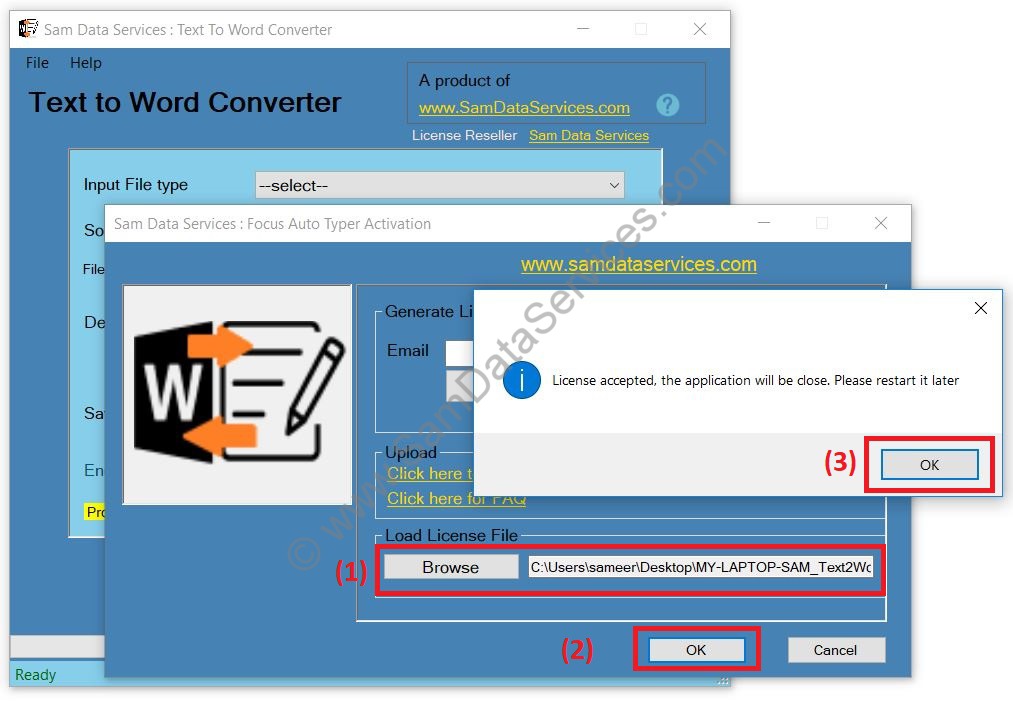
    7. Download License file and browse it on Activation window

    Text to Word Converter License file
    • Restart the software and use the full version

    Any queries can be raised through contact form

  • Announcing Focus Auto Typer 2.1 available for download

    Announcing Focus Auto Typer 2.1 available for download

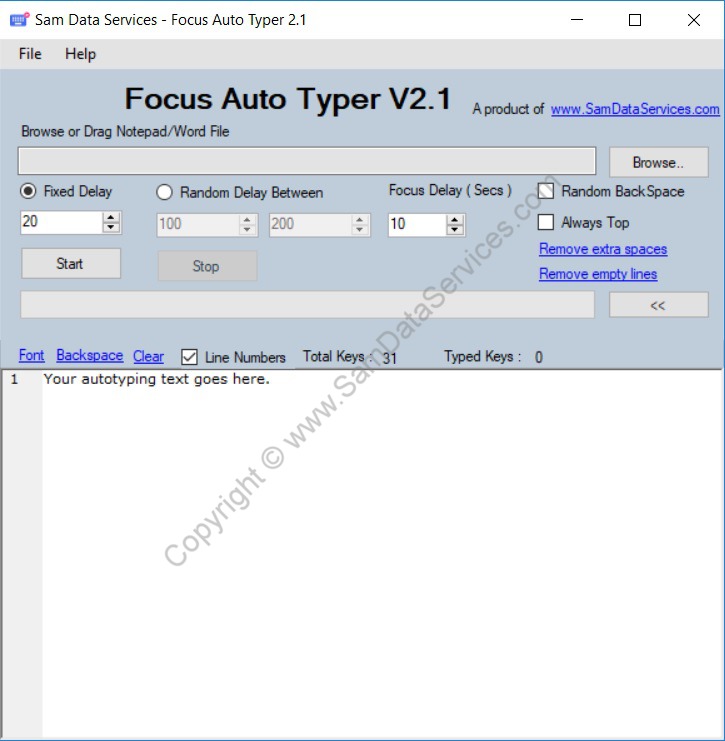
    We have released Focus auto typer 2.1. We have added some new features and minor bug fixes in the preceding version Focus auto typer 2.0.

    Download Focus auto typer 2.1 right now and give it a try.

    Focus Auto Typer 2.1 updates :

    • Browse Ms word files(*.docx and *.doc) support to load text into text editor.
    • Drag and drop file feature also updated to support the same file formats as per browse file.
    • Remove empty spaces feature, to remove all the extra spaces in the text editor. It replace double or more spaces with single space.
    • Remove empty lines feature, to remove all the empty lines in the text editor.

    focus auto typer 2.1

    Upgrading from Focus auto typer 2.0 to Focus auto typer 2.1 :

    Those who have the license for Focus auto typer 2.0 can use the same license file for Focus auto typer 2.1. Hence we request the existing customers to upgrade with version 2.1.

    Hope our customers will like the new features and we are planning more features in the upcoming versions. If you want to suggest any new features, write us at email or contact.