Tag: Focus Map Scraper

  • Focus Map Scraper Guide : Extract Google Maps Data (Tutorial)

    Focus Map Scraper Guide : Extract Google Maps Data (Tutorial)

    “This complete guide will show you how to operate Focus Map Scraper”

    Introduction:

    With Focus Map Scraper, you are able to access Google Maps data in a way you have never done before. This guide presents a straightforward step-by-step tutorial covering how to use the tool as a Chrome Extension to efficiently extract business information, location data and much more for content, research and marketing. Your website will benefit from using this business lead scraping.

    focus map scraper dashboard screenshort

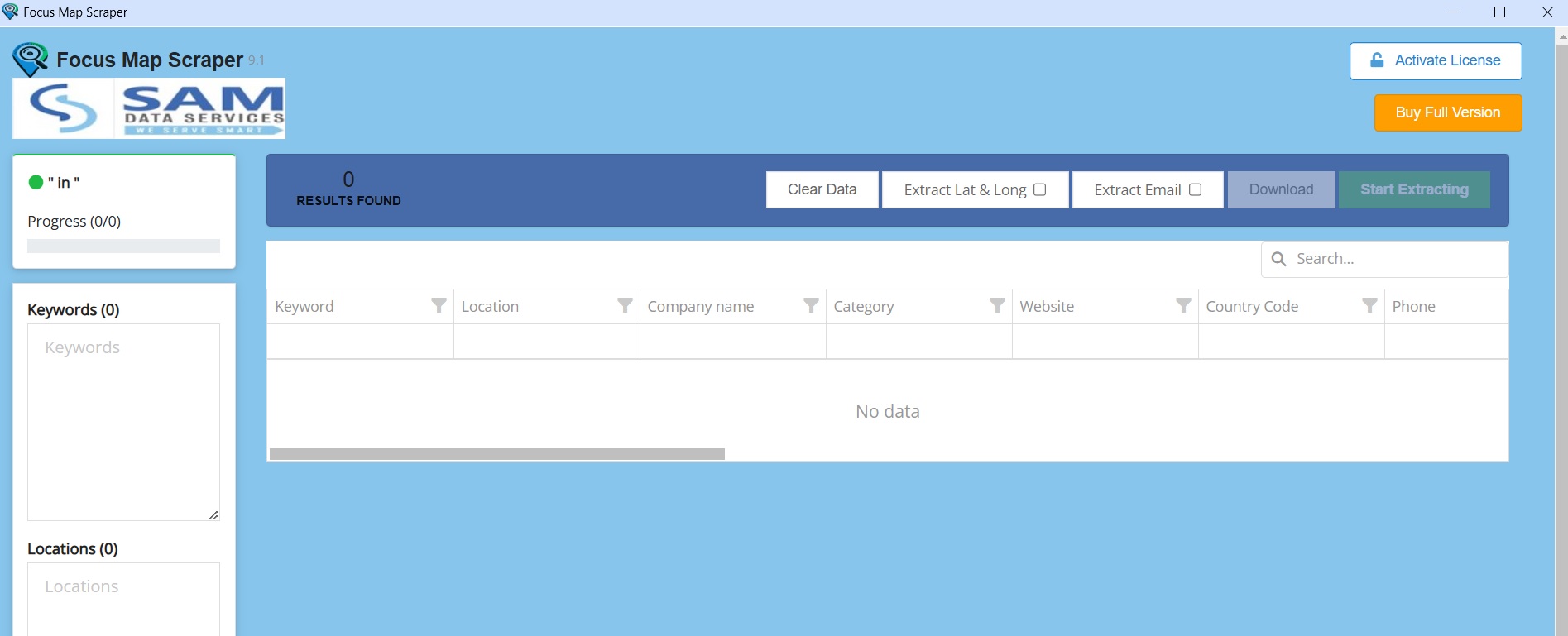
    “Focus Map Scraper software interface”

    This business lead scraping tool offers serious value to businesses. Following this guide, you will learn how to use this tool and extract business information, seek new opportunities, and use this for marketing.

    What is Focus Map Scraper?

    • Focus Map Scraper is easy to use and allows you to extract different types of data from Google Maps such as.
    • Business Information: Names,Emails,addresses,phone numbers,websites,ratings,and reviews.
    • Location Data: Coordinates (latitude and longitude), postal codes, and neighborhoods.
    • Images: Business logos and photos.
    • Opening Hours: Opening hours and any special hours and more.

    How to Use Focus Map Scraper to Boost Your Content:

    1. Installing the Extension:

    focus map scraper steps screenshot

    2.Activate the Extension:

    launch focus map scraper screenshot
    focus map scraper activation screenshot

    3. Start Scraping:

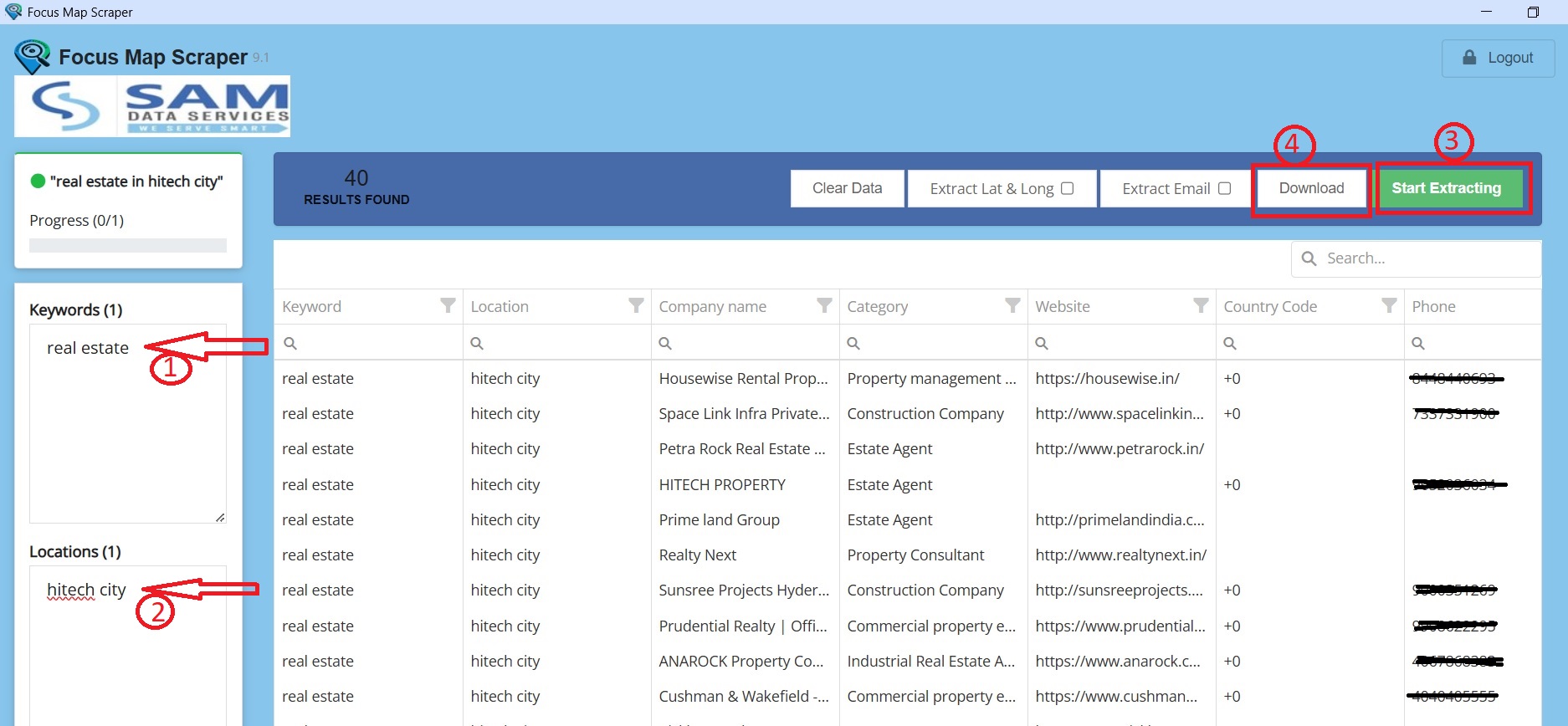
    • Focus Map Scraper allows you to Add keywords, location, and even extract email addresses, while also giving you control over the search duration.
    focus map scraper lisence screenshot

    Tips for Using Keyword and Location:

    • Keep it simple: Use small precise keywords make your results better. For location-specify City or Pin Code In a template. “(keyword)Real Estate (location)(your area or city name)”.
    • Be precise: the more precise your keywords and locations are the more targeted your results will be.

    Extract the Data:

    Click ‘Extract’ and you will instantly commence the extracting of the data and obtain the correct and relevant information for what you were after.

    focus map scraper screenshot
    focus map scraper lisence screenshot

    You can easily export the data into Excel or CSV, making it easy to continue on your own policy examination or analysis tools, by simply clicking on the download button. You may also clear your history and start a new search with one-click, promoting seamless use.

    download screenshot

    If any queries arise, you can contact us through email at samdataservices(at)gmail.com or by filling out the contact form

  • Activate Focus Map Scraper License Key (2025 Setup Guide)

    Activate Focus Map Scraper License Key (2025 Setup Guide)

    “This guide will describe the process of activating your Focus Map Scraper License step by step and help you master the simple process of unlocking the advanced features to maximize your ability to extract data.”

    Why do you need a Focus Map Scraper License?

    The Focus Map Scraper license gives you access to advanced features that add significant value to your data extraction ability.
    • Export Extracted Data: You can easily export the extracted data into a variety of formats (CSV or Excel, for example.) and utilize it in other applications, data analysis products, and databases accordingly.
    • Extract Data More Than 50 records: For the basic version of Focus Map Scraper, you might have limitations on the number of records you may extract. A license will remove the limitation for extracting a virtually unlimited amount of records for effective data analysis, while improving the speed and ease in which you extract records.
    • Download Extracted Data: Store received data extracted on the extracted data on your local computer for offline analysis, storage or further processing.

    How to Buy a Focus Map Scraper License?

    To activate your Focus Map Scraper License, Just follow these simple steps.

    Option 1: Purchase through the Focus Map Scraper Application

    focus map scraper license screenshot
    1. Open the Focus Map Scraper Application: After successfully installing the extension, open Google Chrome, and launch the extension on your system.
    2. Buy Full Version : Locate and click the “Buy Full Version” button on the top right corner of the application interface.
    3. Re-direct to Sam Data Services Website: You will be taken to the purchase page on the Sam Data Services website.
    4. Choose Your Payment Method: Choose the payment method of your choice from the options available (e.g. UPI, Bank Account or PayPal).
    5. Make Payment: Make the payment and then you should receive a payment confirmation.
    6. Fill the Activation Form: While on the Sam Data Services website, there will be an activation form, complete it. You may be asked to upload a screenshot, or a copy of your payment receipt, as proof of purchase – if required upload it to the form and then submit.
    7. Receive Activation Key: You will receive your activation key via email within an allocated timeframe.
    focus map scraper license screenshot
    focus map scraper license request submit

    Option 2: Purchase through the Sam Data Services website.

    Buy License button
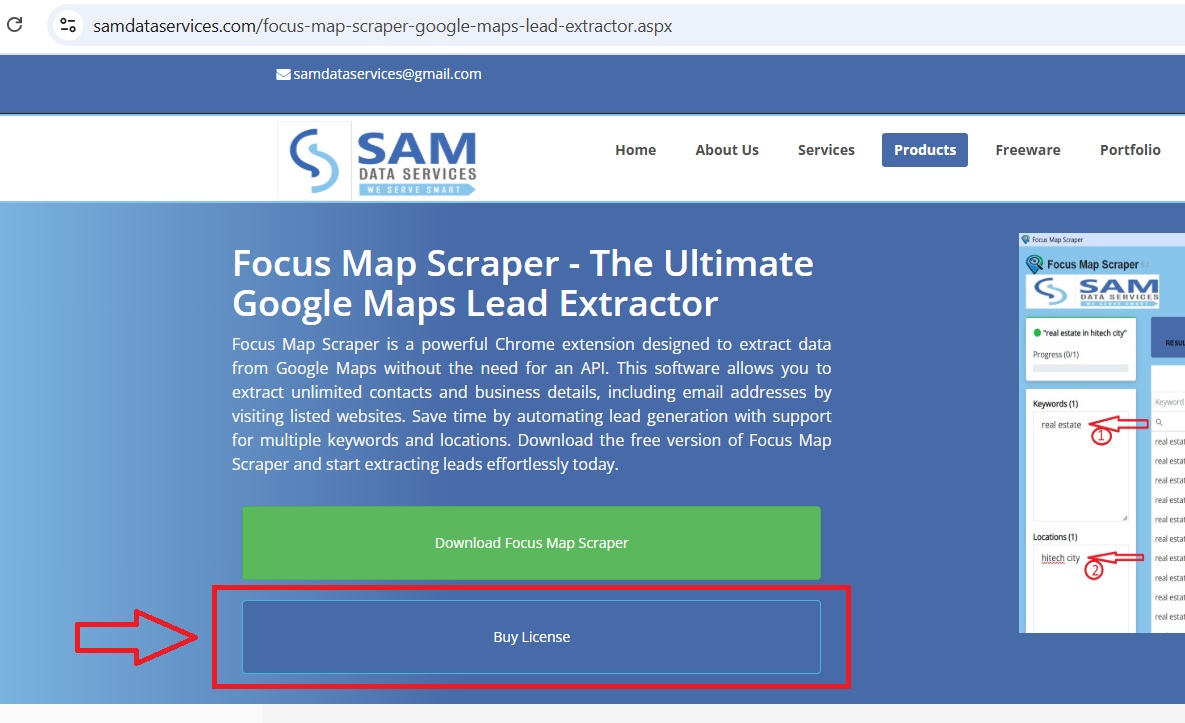
    • Select Buy License: Locate the “Buy License” option on the “Focus Map Scraper” product page, you will be re-directed to the Buy page.
    • Complete the same steps above in point 4 under Option 1.

    Disclaimer: Please verify the account details before initiating any transactions. Sam Data Services is not responsible for any incorrect transfers or misuse of this information.”

    To Activate Your License:

    • Open the Focus Map Scraper Application
    • Click Activate License: Find the Activate License button in the top right corner of the application.
    Activate License
    • Enter your Activation Key: Simply copy the activation key emailed to you and paste in the appropriate box.
    focus map scraper Activation Window
    • Start Unlimited Extraction: When the activation is successful you will be able to start extracting unlimited data.
    focus map scraper license version

    Buying a Focus Map Scraper license is a smart choice for companies and individuals with a desire to use data. Utilizing premium features like unlimited Data extraction and easy data export will provide a much more powerful data extraction and, ultimately, usage experience.

    With a license, you will maximize the potential of Focus Map Scraper with the ability to dramatically improve data-driven decision-making.

    If any queries arise, you can be contact us through email at samdataservices(at)gmail.com or by filling out the contact form

  • Focus Map Scraper Install Guide 2025 (Free Chrome Extension)

    Focus Map Scraper Install Guide 2025 (Free Chrome Extension)

    Looking to extract business leads from Google Maps automatically? Focus Map Scraper is a powerful Chrome extension that extracts business data, contact information, and leads from Google Maps without API limitations. This guide will walk you through the complete installation process in under 5 minutes.

    Enjoy the ease of automated lead extraction with our simple yet powerful software that includes features to make your workflow even easier.

    What is Focus Map Scraper?

    Focus Map Scraper is a free Chrome extension that automates Google Maps data extraction. The tool extracts unlimited contacts, emails, and business details without API limitations, making it perfect for:

    • Lead generation for sales teams
    • Market research for businesses
    • Competitor analysis for marketing
    • Local business data for directories

    Start extracting leads today with our free version.”You can still upgrade your subscription for premium features later”

    Focus Map Scraper Chrome Extension Installation Steps:

    Download Focus Map Scraper from our website

    • Click here Click here to be redirected to the Focus Map Scraper product page, click the “Download” button as highlighted in the image below. You will be redirected to the Download page.
    • Complete the Name, Email and Country area as depicted below, then click on the Download Button. This should produce a standard downloaded zip file that contains files for the extension.
    focus map scraper download

    Unzip the file and Locate the extension files folder

    • Find the ZIP file: Locate the ZIP file that you downloaded on your computer (typically in your Downloads folder).
    • Extract the files:Right click on the ZIP file and then select “Extract All” (or something similar). Choose a location on your computer to extract the files to (e.g. your Desktop or dedicated folder).
    • Find the installation folder: After you extracted the ZIP folder, you will need to open the folder that you extracted the files to.
    focus map scraper extract zip
    copy folder path after extracting

    Open Chrome extensions and Switch on the developer mode

    • Open the Google Chrome browser.
    • In the address bar, type chrome://extensions/ and hit Enter or click on the 3 dots button in the right corner of Google Chrome icon.
    • Turn on “Developer mode” in chrome://extensions/
    • Then, Click “Load unpacked” and select the folder that contained focus-map-scraper .

    Step 4: Install extension, pin the extension to get access

    • Load unpacked: Click on the “Load unpacked” button.
    • Select the extension folder: In the window that opens up in your file explorer, navigate to and select the folder containing the Focus Map Scraper files.
    • Pin the extension: After you successfully load the extension, you can pin it for quick and easy access. Click on the Pin icon (looks like a pushpin) located next to the extension.
    • This will allow addition of the extension to the Chrome toolbar
    Load the unpacked extension
    Activate the extension
    Pin the extension

    Ready to use:
    It’s time to start using the Focus Map Scraper You should now see the Focus Map Scraper icon in the toolbar of your Chrome web browser. Click on the icon to open the extension and start using it for web scraping.

    “Grow your business with premium features, new releases, and support with subscription flexibility.”

    Your Focus Map Scraper Chrome Extension installation is complete, and the image shot below shows the software interface.

    Focus Map Scraper interface

    “We’re committed to provide you with the best possible products.”

    If any queries arise, you can be contact us through email at samdataservices(at)gmail.com or by filling out the contact form.